InZOI Clothes: Unlock the Clothing Shops & Other Fashion Options 👜
Is it exaggerating to say that inZOI will be deprived of half the fun without the fashionable clothes and accessories? InZOI not only offers tons of clothing, accessories, and makeup options for character customization in the base game, but also makes clothing and other fashion mods easily available and accessible to players. On top of that, players can also obtain other clothes and accessories in the clothing shops on the map. The game is rich in clothing choices and tries to boost the life simulation experience by giving players a shopping experience in the game. This post will explain how to find more resources about inZOI clothes and how to shop in the game!
What Are the InZOI Clothing Options?
InZOI clothes settings provide many categories and options for players to dress their Zois up. The following table will give a guide on what players can dress their Zois with, including presets, accessories, etc.
| Main Category | Sub-Category | Descriptions |
| Outfit presets | N/A | Presets include set outfits of different styles, suitable for players who do not want to spend too much time on dressing the Zois up. |
| Tops | Tank tops, T-shirts, sweatshirts, shirts, hoodies, vests, knitted | Tops with customizable colors and textures |
| Outerwear | Windbreakers, cardigans, jackets, zip-ups, coats, vests, puffer jackets | Outerwear with customizable colors and textures |
| Sets | Minidresses, long dresses, jumpsuits, swimsuits, homewear, event attire | Sets includes miscellaneous dresses, onepieces, and sets, matching different social occasions. |
| Bottoms | Shorts, pants, miniskirts, mid-to-long skirts | Bottoms with customizable colors and textures |
| Accessories | Socks, stockings | The accessaries in the outfit category refers to socks mainly. |
| Shoes | Heels, sneakers, loafers, boots, slippers | Shoes with customizable colors and textures |
| Underwear | Tops, bottoms | Underwear with customizable colors and textures |


The Sims 4 Enchanted by Nature EP: New Exciting Outfits,
Become a fairy and quit eating!…

Sims 4 Nature’s Calling: Explore the Mysterious Whisper Now from
Log in to unlock the woodwork table exclusively from the event!…

Sims 4 Basemental Drugs Mod: Purchase, Production, Settings, and Buffs
A realistic mod of drug, alcohol, and nicotine abuse that you must try….

Sims 4 Greenhouse: Build a Haven for Your Lovely Plants🪻
A delicate glass room for sunshine, flowers, and some wonderful time. ☕…

Sims 4 Buying a Restaurant: How to Buy and What
Explore how to buy a restaurant and some best designs ever!…
Explore: Cyberpunk the Sun Ending Explained: Become the Legend of Afterlife☀️
Other than the outfit category, inZOI also includes a separate accessories category, different from the accessories in the outfit category. The accessories section has hats, eyewear, necklaces, earrings, headpieces, nails, wristwear, rings, and piercings.

Explore: Cube Escape Paradox: Investigate the Murder with Dale Vandermeer
What Are the Resources to Access InZOI Clothes?
In the game, there are multiple ways for players to explore inZOI clothes and put on fashionable clothes for their Zois. The game provides mainly three ways for players to explore their clothing options. Additionally, Zois will change into their work clothes as well when they are at the workplace.
First is the base game “Create a Zoi”, which offers many clothing options for players to get started.
Second is the inZOI Canvas, where creators upload their customized clothes and accessories for players to download and add to their Zois.
Third is the clothing shops in the city map, where players can explore and buy clothes directly from the store.

InZOI Facial Capture: How Crazy It Is to Let My
My Zois can make the same facial expressions as I do!…

InZOI Clothes: Unlock the Clothing Shops & Other Fashion Options
Can’t wait to shop in Dowon and Bliss Bay!…

InZOI University: Embark on the University Adventure and Harvest the
Go to the school and continue your Zoi’s education!…

InZOI Money Cheat: How to Use the Cheat & Other
Can I become rich overnight in inZOI?…

InZOI Romance Secrets: How to Go from Strangers to Soulmates🥰
Can I have more than one lover in inZOI?😍…

InZOI Cars: Drive Stunning Cars in InZOI’s Open World (Get
Can I drive Mercedes-Benz in inZOI?!…
Explore: InZOI University: Embark on the University Adventure and Harvest the Most out of It!
The following sections of this post will mainly elaborate on these three methods of browsing through all the fashion options that inZOI has to offer. They greatly boost the fun and gaming experience of inZOI, and players can definitely look forward to more future updates, which will complete the game even more!

InZOI Cute Cat Poster of Multiple Sizes! GET IT NOW!😽
Explore: InZOI Money Cheat: How to Use the Cheat & Other Ways for Money
Create a Zoi: the Base Game Clothing Options
“Create a Zoi” is the page for players to customize their Zois with names, personalities, traits, body shapes, faces, clothing, etc. The page includes the base game clothing options, not including the clothes that are available in the clothing shops in the game. InZOI features very detailed categorizations of the outfits and accessories, as listed in the previous table⬆️.
Players can find many clothing options here, including accessories, without going through the trouble of shopping in the in-game clothing stores or downloading clothes from inZOI Canvas. To make the process even easier, the game presents many stylish presets and sets for players to customize their characters speedily and get into the game.
Explore: Five Best Games Like RDR2 to Dive Into
Want to change the outfits after launching the game? No problem. In the game, players can click the wardrobes, mirrors, and clothing racks at any time to enter the clothing customization page again. Although after creating the family, players cannot change the Zois’ names, age groups, gender, etc., anymore, the game still allows players to come back to the “Create a Zoi” page and have access to the base game clothes and accessories.
Simply click the wardrobes or hanging racks, and choose “Select Outfit”. Another way is to click the mirrors and choose “Edit Appearance”. Both ways allow players to select the inZOI clothes for their Zois again.

InZOI Cute Cat Poster of Multiple Sizes! MAKE YOUR ROOM DREAMY NOW!😽
Explore: Your Complete Guide to the Mystery of Emerald Ranch RDR2
InZOI Canvas: More Fashionable Choices by Creators
InZOI has made the game incredibly easy to download clothing mods made by the online creators.
By using inZOI Canvas, players can download the outfits they like directly to the game and see them updated in the character editing page (through “Create a Zoi”, editing appearance at mirrors, or selecting outfits at wardrobes).
Follow the steps to download outfits from the inZOI Canvas!
- Open the inZOI Canvas by clicking the “C” icon at the upper right corner of the character editing page. This will open the webpage in the game.
- Browse the outfits section and download any of the outfits. There will be pop-up notifications telling players that the download has been completed.
- The new outfits will all show up at the “Outfit Presets” section, no matter what kind of outfits they are.

Explore: Navigating Tsuki’s Odyssey: Key Insights for a Smooth Journey
The downside of the inZOI Canvas is that the clothes are all set as presets, instead of updating the items to their respective categories. For example, if players download an earrings design to their game, when they want to change to this pair of earrings, the whole set of clothes will change. Players can still preserve the earrings only and change the other clothing to the base game clothes. However, they cannot combine the earrings from inZOI Canvas with clothing from inZOI Canvas as well, because the design always comes as a set.
It’d be better to open the webpage inside the game. If players start downloading the clothes from the webpage outside the game, the downloading in the game may be interrupted. Therefore, starting the download from the webpage inside the game leads to fewer errors.

Explore: Mastering the Fence RDR2: How to Sell Illegal Goods and Craft with Legendary Animal Loot
InZOI Clothing Shops: Go for a Shopping Spree!
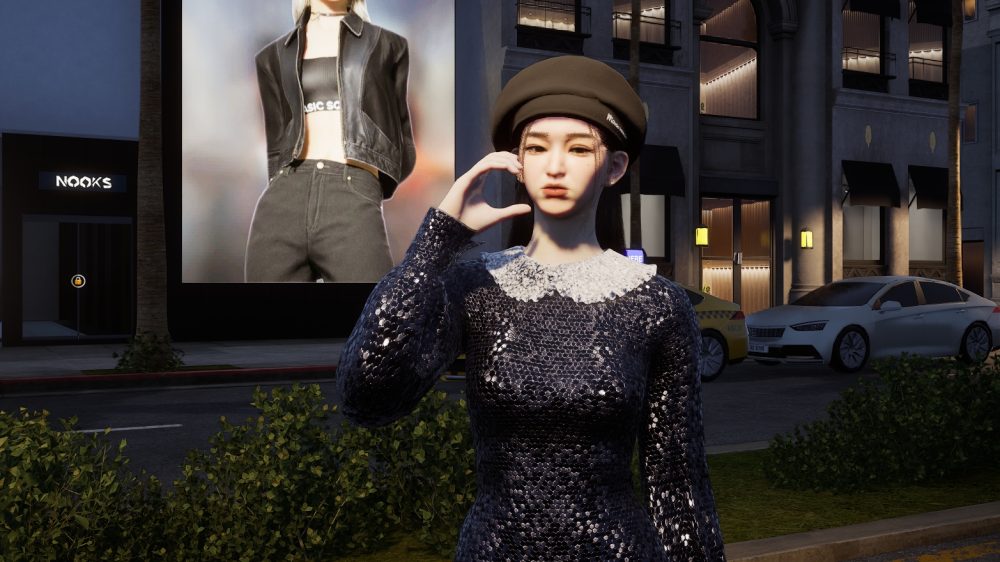
Other than the clothes in the character editing page, inZOI features clothing stores in the city map as well! Players can visit the clothing shops in the game to try out outfits and accessories that are not available in the character editing page.
There are currently two clothing stores, one in Dowon, the other in Bliss Bay. The Dowon clothing store is called Jenna Fashion, and the Bliss Bay one is called Nook’s Select Shop. Players can visit these two shops by clicking “Go Here” or “Drive Here” on the map.

Explore: Rusty Lake Hotel: Unravel the Revenge Story and Earn All 3 Stars
Both clothing stores open every day from 8 a.m. to 10 p.m. Sometimes the stores are not functioning yet if the opening time is reached, but the staff has not arrived yet. Players can drop by after 9 a.m. to avoid this situation.
Jenna Fashion has one floor, three outfits, two hats, and three necklaces. Nook’s Select Shop has two floors, five outfits, two hats, and three necklaces. Nook’s has more clothing options, but most of the products are the same in these two shops. Additionally, it seems like the developer has not randomized the selections yet, so players will always get the same selection of outfits no matter how many times they drop by.
Another drawback of this feature is that the developer has not set a follow-up for the purchase yet. The clothes players purchase from the store will disappear if the Zoi changes the clothes. To make the clothes last longer, players can turn off the autonomy of their Zois to prevent them from taking off the newly purchased clothes.

Explore: Navigating Cyberpunk Phantom Liberty Endings: Choices and Consequences
FAQs
Can you make clothes in InZoi?
Yes! Players can design their own clothes in inZOI. In “Create a Zoi”, select “Custom” on the right bar of the outfit category, and then design your own clothes by combining different parts of the clothes together. Players can also customize jewelry in this way as well. However, the parts and designs of the clothes players can choose from are limited, so it is not creating clothes completely freely.
How to access inZOI clothes mods?
In short, players can access the inZOI clothes mods from the inZOI Canvas. There are many trendy designs uploaded by online creators every day. Players can start the downloads from its webpage outside the game, or even better, open the webpage and start the downloads directly inside the game. The downloaded clothes mods will appear in the “Outfit Presets”.
Conclusion: InZOI Clothes
InZOI is certainly being friendly to fashion lovers and designers as a life simulation game. The joy of shopping, dressing, and designing clothes can be fully satisfied in the game. On top of that, there is also the happiness of sharing the clothing design to the inZOI Canvas with the community. The inZOI Canvas, as well as the clothing shops in the city, are great designs to boost the user stickiness to the game and to enhance the immersive gameplay experience.
On the other hand, there is room for improvement as well, especially in the shopping experience in the game. The clothing shops should have more diverse selections, and the purchased clothes should have a category in the character editing page as well. Let’s look forward to the updates and a better gaming experience in the near future!