InZOI Cars: Drive Stunning Cars in InZOI’s Open World (Get Car Mods Now!)
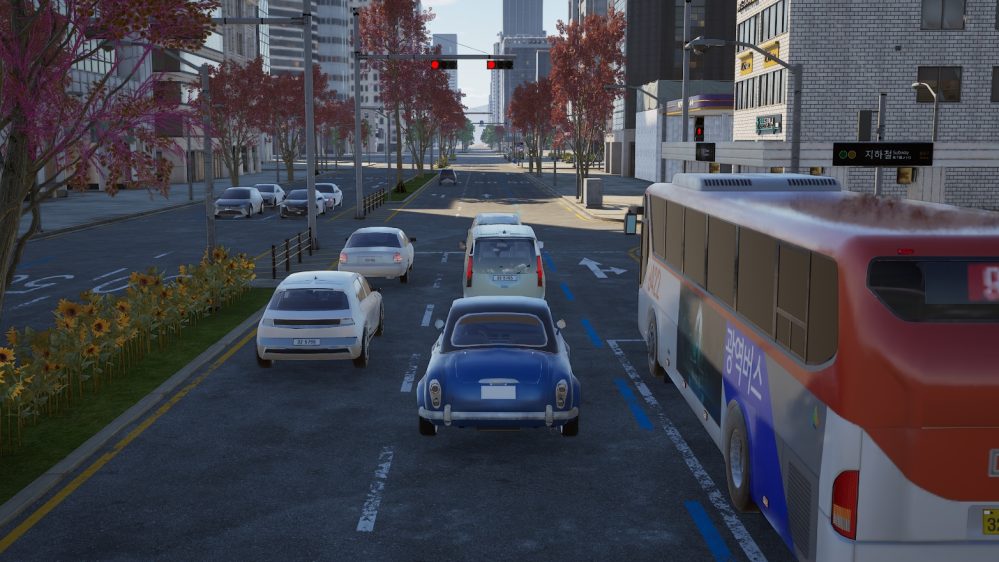
Are you ready to cruise the fascinating cities in inZOI with your newly purchased cars? Great news! InZOI features an open world for players to arrive at their destinations directly without loading pages, given that they can read the map. What’s more, players can purchase whichever car they like from the menu and drive both automatically and manually to reach their destinations! What are the great features and designs of InZOI cars and driving systems? How to buy a car? Are there car mods available now? This post will answer all these questions and provide a comprehensive guide to the cars and car mods of inZOI!

Does InZOI Feature Open-World Maps?
Before talking about inZOI cars, let us explore the question of whether inZOI features open-world maps first. Car buying and driving would be less engaging and attractive if the game were not an open-world game, because that would degrade the car’s function to simply props. Players enjoy the real-world experience of cruising around the city in their cars and appreciating their new cars. Can inZOI live up to those expectations?
While there are loading pages triggered when players are using the fast travel options, inZOI allows players to explore the map and reach each location directly without loading pages when the players are not fast traveling.
Explore: InZOI Gameplay: Why Fans Are Obsessed (And Some Are Disappointed)
To further explain, there are two ways for players to travel on the map. One is to open the map and select “Go Here” or “Drive Here” for the specific location, and the other is to walk or drive manually in the world without using the fast travel, “Go Here” or “Drive Here,” on the map.
Technically speaking, inZOI has realized its open-world setting because the characters are not limited to specific locations, and they can approach the locations and items in the world freely.

The Sims 4 Eco Lifestyle Expansion Pack Review & Guide
Make a profit by selling water & electricity….

How to Get Married in The Sims 4: Complete Marriage
Explore more dynamic marriage options here!…

The Sims 4 Cottage Living Expansion Pack Review & Guide:
If you love farm simulation, Cottage Living is a great option for you!…

The Sims 4 Break In and Steal Mod Guide: Burglar
For Sims who don’t want to work……

InZOI vs The Sims: Is InZOI Better Than The Sims
The best life simulation to spend hours on!…

5 Best Games Like The Sims 4 to Play in
More games to get addicted to……
Explore: Red Dead Redemption 2 Good, Honest, Snake Oil: Snake Oil and Quackery in the 19th Century US.
How to Purchase InZOI Cars?
Purchasing inZOI cars is extremely easy. Follow the steps listed below to purchase the cars!
- Open your character’s phone.
- Click “Dream Car,” the orange icon with a car symbol on it.
- Click “Buy” at the bottom banner.
- Select a car you like and click the “Buy” button under that car.
- Choose a color you like and hit “Buy.”
- The car will show up next to your property and have a blue icon on top of it as a mark.
Note that one family can only own one car for now. Therefore, after purchasing one car, the “Buy” buttons for other cars will be greyed out.
However, players can click “Sell” in the “Dream Car” menu on the phone to sell their current car and purchase another car if they like.
The buy and sell happen instantly. Players can purchase a car to check what it looks like in the game world, especially in terms of the coloring. The menu does not show what the car looks like after applying different colors.
Currently, the available cars on the menu are as follows:
| Car Name | Colors | Price |
| Z-Car | White, Silver, Black, Blue, Green | 10,000 |
| Sedan | White, Silver, Black, Blue, Green | 30,000 |
| SUV | White, Silver, Black, Blue, Green | 55,000 |
| Hyundai INSTER | Silver, Black, Blue, Brown, Beige | 14,600 |
| Hyundai AZERA | Silver, Dark Grey, Blue, Grey | 37,110 |
| Hyundai IONIQ 5 | Baige, Silver, Blue, Brown, Green | 47,000 |

Explore: Tropico 6 Multiplayer: Friends or Foes?
How to Drive InZOI Cars in the Game?
InZOI cars have two modes when it comes to driving them. Players can drive either manually or automatically.
To Drive Manually
Players need to enable manual driving in the options.
- Open the game menu by pressing “ESC.”
- Select “Options.”
- Go to “Gameplay.”
- Scroll down till you see “Driving (Experimental)”
- Turn on “Enable Manual Driving.”
After turning on the manual driving, your ZOI will be able to drive the car manually!
Explore: Cyberpunk Dystopia in Cyberpunk 2077: Dominance and Escape 🌇
Next, players can click the car and choose “Get In”. And then choose to sit in the driver’s seat to start manual driving. Or, players can click the character they want to get in the car, select “Car”, and then choose “Get in Car”. Both ways will bring the character to the driver’s seat of the car and start driving.
One thing worth mentioning is that inZOI does not feature a mini-map HUD or a map marker system. Other open-world games (such as Cyberpunk 2077) that have driving systems will usually allow players to open the map and place markers on the destination. Then, the mini-map will automatically show the route to the marker so that players will not get lost. InZOI does not have the marker and mini-map currently, so it is rather difficult to switch between the map and the road drive to find the route to the destination.

Explore: Chinese Visual Novel: Feminist Wave with Chinese Characteristics
To Drive Automatically
Players can open the city map and choose “Drive Here” for the specific locations on the map to use their cars automatically.
After selecting the location, the character will walk to the roadside and call the car. The cutscene includes the start and the end of the drive, and the traveling part will be skipped when the loading page is displayed to the players.
Explore: Sims 4 Food Mods: Nothing Beats a Full Fridge and a Full Belly!🍰
This is a relatively balanced way to conduct fast travels in inZOI. First, players do not need to worry about the routes to reach the destinations. Second, it saves players the trouble of driving all the way. Third, players still get the chance to appreciate their cars at the start and the end of the journey.
Until the development team makes further add-ons concerning the markers and the mini-map, automatic driving is a much more convenient option compared to manual driving.
Explore: Sims 4 Money Mods: Must-Have Income Solutions for Both Lazy and Hard-Working Sims!
Which InZOI Cars Mod Is Available Now?
The game has only been out for one month, but the good news is that several car-related mods have already been available to boost the players’ gaming experience! This section will go over these car mods with their pros and cons, as well as installation tips!
Stunning Car Props: Mercedes-Benz C-Class C 200 AMG and Porsche 911 GT3 RS
There are some stunning car props available as inZOI car mods now. Although these mods are only for display purposes and the characters cannot drive them, they still function as cool displays in the house!
Try out Mercedes-Benz C-Class C 200 AMG! After downloading and installing this mod, players can place this car prop on their properties. It is a convenient and fashionable design for inZOI house designer players.
- Click “Download” and unzip the entire folder to “Documents/inZOI/AiGenerated/My3DPrinter”.
- Then, switch on the game.
- Turn on “Build Mode”.
- Click “Craft” on the left-hand menu.
- Click the car in the “3D-Printed Furniture” category and place it in the world.
Explore: Sims 4 Dine Out Expansion Pack: Perfect for a Foodie!🍴
Another car prop is Porsche 911 GT3 RS. It has a similar function to the Mercedes-Benz mod. The download and installation process is the same as the Mercedes-Benz mod as well.


More Car Options: Yoco Unlock 4 News Cars v1
This mod allows players to have 4 more car options in the buying menu! On top of the cars available in inZOI base game, this mod adds another 4 cars:
| Car Name | Colors | Price |
| Classic Car | White, Silver, Black, Blue, Green | 15,000 |
| Pickup Truck | White, Silver, Black, Blue, Green | 40,000 |
| Hyundai STARIA | Silver, Grey, Black, Yellow, Brown | 20,000 |
| Hyundai IONIQ 9 | Beige, Grey, Brown, Black, White | 50,000 |
Note that this mod requires “InZOI Mod Enabler” to run in the game. The installation process of this mod is more strenuous, but it is definitely worth it!
Players need to follow the instructions carefully to install both the inZOI Mod Enabler and Yoco Unlock 4 News Cars v1. Install both of them according to the mod installation instructions on the “InZOI Mod Enabler” page. Upon successfully installing both of the mods, players can open the phone and the “Dream Car” page. The four new options will appear on the buying page.

Explore: Sims 4 Buying a Restaurant: How to Buy and What are Some Top Options in the Gallery
FAQs
Will inZOI have cars?
InZOI right now features cars, manual driving, and automatic driving in the game. Players can purchase, sell, and drive cars in the city map and reach whichever destinations they want! They can also use the car to fast travel in the city and enjoy the driving cutscenes of the fast travels.
Can you actually drive in inZOI?
Players need to turn on the “Enable Manual Driving” button in the Options. Then, all they need to do is just buy a car and start manual driving! However, as manual driving is still in its experimental stage, there is no map marker, mini-map, or auto-camera for driving yet, which means that players need to figure out the route themselves and adjust the camera manually.
Where is the car in inZOI?
Players can find all the available car options in their characters’ phones. Open the phone. Click “Dream Car”. All the available cars are in the “Dream Car” menu. After the purchase, the car will show up next to your property with a blue marker on top.
When your ZOIs travel to other destinations by car, players will need to click their characters to “Get in Car” because the game parks the car elsewhere, and it will not be waiting on the street.
Conclusion
InZOI cars and driving systems are certainly great additions to the game. They elevate the fun of the gameplay and offer a more immersive life-simulation experience to the player. On the one hand, players can purchase cars to enjoy the financial success they achieve in the game and make their properties look more realistic, and on the other hand, the complimentary open-world system promises a more real-life-like living experience in the virtual world.
Although there are more adjustments required to further improve the car and driving system, what the game has right now is inarguably a good start. It is also one step further on top of the open-world and car-purchasing system in The Sims 3!