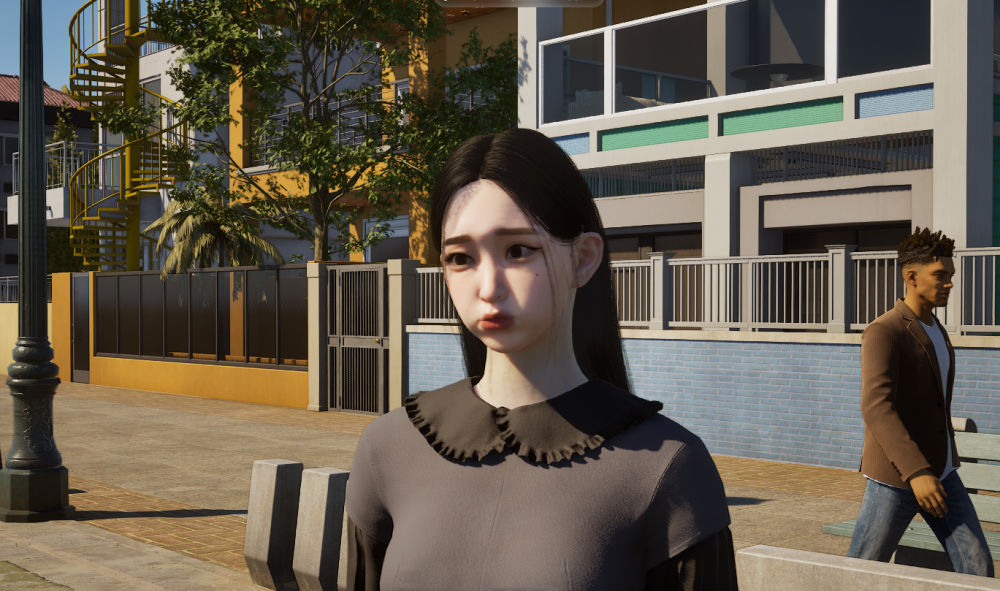
InZOI Facial Capture: How Crazy It Is to Let My Zoi Have My Facial Expressions🤪
There are so many cool features and techie things to try out in inZOI, and facial capture is only one of the interesting features. The facial capture is like a semi-breaking of the fourth wall, allowing players to directly engage with the game with their facial inputs. Imagine that players can play the game not only with their hands, but also with their facial expressions. On top of that, how unique would the experience be to have your Zoi follow your facial expressions? InZOI facial capture functions in this way exactly to bring the immersive experience of virtual living to the next level. This post will take you through the ins and outs of inZOI facial capture features and explain the novel experience related to it!

What Does This Feature Do?
InZOI facial capture is a feature in the game to allow players to capture their facial expressions and upload the expressions to their Zois in real-time. As the phone camera captures players’ facial expressions in real time, the Zois will make the same expressions in inZOI.
The name of the feature might be a bit misleading at first, and some players may think that inZOI facial capture can capture their facial features and upload their faces directly to their Zois and have their Zois look like them. It sounds like a pretty novel and interesting function to have Zois look exactly like the players. Unfortunately, for now, facial capture is only for facial expressions, not facial features.

InZOI vs The Sims: Is InZOI Better Than The Sims
The best life simulation to spend hours on!…

Games Like InZOI: Six Best Life Simulation Alternatives to Play
Try out these simulation games!…

InZOI Facial Capture: How Crazy It Is to Let My
My Zois can make the same facial expressions as I do!…

InZOI Clothes: Unlock the Clothing Shops & Other Fashion Options
Can’t wait to shop in Dowon and Bliss Bay!…

InZOI University: Embark on the University Adventure and Harvest the
Go to the school and continue your Zoi’s education!…

InZOI Money Cheat: How to Use the Cheat & Other
Can I become rich overnight in inZOI?…
Explore:InZOI Clothes: Unlock the Clothing Shops & Other Fashion Options 👜
You may want to ask what extra gaming experience players can have with the facial capturing. Well, inZOI facial capture can be used in both the “Create a Zoi” page and in the game. While the game allows the Zoi to make several facial expressions, such as smiles, frowning, pouting, etc., facial captures let Zois make more nuanced facial expressions, responding to players’ facial expressions exactly.
Moreover, it is convenient for players to customize the Zoi’s facial expressions further for photo taking, no matter it is in “Create a Zoi” or in the game. Players can make their Zois uniquely reflect any expressions made by themselves. It is also easier for photo-shooting when players do not have to manually adjust the Zoi’s expressions.

Upgrade Your Gamer Room with Dreamy Wall Decors!😻
Explore: InZOI University: Embark on the University Adventure and Harvest the Most out of It!
When Can Players Use Facial Capture?
Players can use the InZOI facial capture in “Create a Zoi”, during gameplay, and in the photo mode as well. As long as the facial capture is turned on and the camera is facing the player’s face, the Zoi will follow the player’s facial expressions as captured by the camera.
In “Create a Zoi”, players can customize the Zoi while turning on the facial capture feature. Testing different facial expressions on the Zoi can help players better customize the facial features to their liking. When players are using the character studio, they can turn on the facial capture as well to create great photos with the facial expressions they like. These photos can be uploaded to the inZOI Canvas as well and shared with the community!

The Sims 4 Eco Lifestyle Expansion Pack Review & Guide
Make a profit by selling water & electricity….

How to Get Married in The Sims 4: Complete Marriage
Explore more dynamic marriage options here!…

The Sims 4 Cottage Living Expansion Pack Review & Guide:
If you love farm simulation, Cottage Living is a great option for you!…

The Sims 4 Break In and Steal Mod Guide: Burglar
For Sims who don’t want to work……

5 Best Games Like The Sims 4 to Play in
More games to get addicted to……

The Sims 4 How to Get the Cow Plant: A
Get a Cowplant, feed it, and milk it for bottles of Essence!…
Explore: Cyberpunk 2077 Best Ending: Shine a Light on the Bright Side of the Top 3 Finales
Players can turn on the facial capture during gameplay, too. The Zoi will have players’ facial expressions in real time, no matter what the Zoi is doing. For example, when the Zoi is having a conversation with others, players can make strange facial expressions. The camera will capture these expressions and have the Zoi do the same, too. This feature could be convenient if players need screenshots for story-making or anything, with specific facial expressions.
The facial capture can be enabled in the photo mode during gameplay as well. Players can take lovely photos with the facial capture enabled against any background they want in the city. The facial capture will still be working during the time pause.

More Perfect Gifts for InZOI Fans!😎
Explore: The Mr. Rabbit Magic Show: Celebrate the Tenth Anniversary of Rusty Lake
How to Turn on InZOI Facial Capture?
The current inZOI facial capture is only available for iOS, and mobile users with the iOS system can enable the feature by following the instructions.
Players can follow the steps to turn on the facial capture feature:
- Connect the laptop/computer that runs inZOI and the mobile for the facial capture to the same wifi network.
- Scan the QR code or download the Live Link Face app from the Apple App Store.
- Choose Live Link (ARKit) as the capture mode in the app.
- Tap the settings button in the upper left corner of the app.
- Tap “Live Link” and choose to add a target.
- Click “Read” button in the face capture pop-up window in inZOI to get the IP address.
- Type the IP address in the target and tap “Add” in the app.
- Click “Next” in inZOI, and the window should show the mobile device that is ready for connection.

Explore: A Taste of Night City: Takemura’s Food Journey
The above-mentioned steps are also shown in the face capture pop-up window in inZOI. Players only need to click the face capture button at the top bar of the game and follow the instructions to enable the facial capture feature.
Mind that players do not need to tap the record button in the Live Link Face app to use this feature. The facial capture is going on in real time, even when users are not recording their facial reactions. Simply turn on the app and connect the mobile device to the game. Show your face in front of the camera and try to make some facial expressions. The Zoi should do the exact same expressions in real time!

Explore: Fun Facts About Cyberpunk 2077 Food and Food Vendors
What Are the Drawbacks of Facial Capture?
InZOI facial capture is definitely a cool feature to have in a life simulation game. Are there any drawbacks to this feature, though?
One thing about this feature is a bit disappointing, which is that it only captures facial expressions, instead of facial features. Players cannot exactly create a Zoi who looks exactly like them in the game through facial capture and scanning. It does not allow players to upload faces to the game either. All in all, the feature does not fundamentally challenge the existing character customization design in life simulation games.

Explore: Cyberpunk 2077 Clothing Shops: Jinguji, Kabuki, and Wellsprings
The facial expression capturing is real-time with no lagging, but Zoi’s expressions are not as vivid as a real human face. The tongue movement is hard to capture, such as sticking the tongue out. The eyebrows are a bit stiff as well. The major movements are on the eyes, cheeks, and mouth. Players may need to exaggerate their facial expressions to achieve the effects they want on Zois’ faces.
The mobile device may get very hot after the Live Link Face app runs for a while. Players might not be able to turn on the facial capture feature for a long time. It is more practical to turn it on only when players need to use it in screen shooting and photo shooting. This can avoid the mobile device getting too hot and the app consuming too much battery of the mobile device.
In conclusion, it is a very novel experience to have the face as the input to the game. At the same time, it does not revolutionize the way of customizing characters, and its practical use is limited.

Explore: Explore Cyberpunk 2077 Food Settings
FAQs
Can you scan your face in InZOI?
Yes. iOS users can download the Live Link Face app and connect their mobile devices to inZOI. The app will capture the players’ facial expressions in real time, and the Zoi will make the same facial expressions as the players in the game. The scanning and capturing will go on continuously as long as the devices are connected and the players’ faces are in the camera. As it is happening in real time, players can not scan and upload their face manually to inZOI, and the scanning is not about the facial features.
What is facial capture on InZOI?
Facial capture in inZOI is a function players can use to capture their facial expressions in real time and have the Zoi follow their facial expressions. The facial capture button is at the top bar of the game’s UI. Players can follow the instructions to install and enable the feature according to the pop-up window after clicking “Facial Capture”.
This function can be used in “Create a Zoi”, the photo mode, and during gameplay as well. It seems that the most convenient way to use it is for taking screenshots and photos.
Can you import faces into InZOI?
No, unfortunately. Although inZOI has the facial capture mode, players cannot import their faces to the game or upload their scanned facial features to the game. The facial capture mode is only for reading players’ facial expressions and reactions in real time, and then having the Zoi copy players’ expressions. There is no manual importing or uploading. The process happens in real time when the mobile device is connected to the game, and the mobile device camera is capturing players’ faces.
Conclusion
InZOI facial capture is a very interesting mode to try out in the game, and it can help players further customize the facial expressions they want on their Zois. The photo taking and screenshots with specific facial expressions will become easier for the players as well. On top of that, inZOI has other novel things for players to try out, too, such as motion capture and 3D printing.
However, to make the mode more engaging and practical, the developer might still need to figure out the core functions of the facial capture. Is it only for capturing the players’ facial expressions? What other functions can it have in the game? Currently, it seems that the main question is still unanswered, which is why players would want to use or have to use the facial capture at some point.